Workplacer 2.0 is hereWorkplacer Know · Improve · Control · Report & AskWatch the launch film (1:55) →
Workplacer.AI
CustomersWho it's forInsights
Sign inBook a demo
Workplacer Control

Keep control. Nothing slips through.

Workplacer Control stands on Workplacer Know. Every notice date, review and duty has an owner and a reminder in time; each person sees what is waiting for them, and the company sees the year ahead.

Book a demo →See the modules
Upcoming datesAcross 96 contracts
Renegotiation window · Edinburgh QuartermileOpen now
Rent review · Stockholm HQIn 53 days
Break option · Dublin Docklands2027
Reminder sent to the lease ownerRent review · Stockholm HQ · 53 days to go
The modules in Workplacer Control

What is due, and who has it

The year ahead

What is due across the company, and when: a wheel of the year with a ring for each kind of work.

  • Overdue, next 7 days and next 30 days
  • Contract dates, duties, projects and visits, each on its own ring
  • Click a month to open it in the schedule
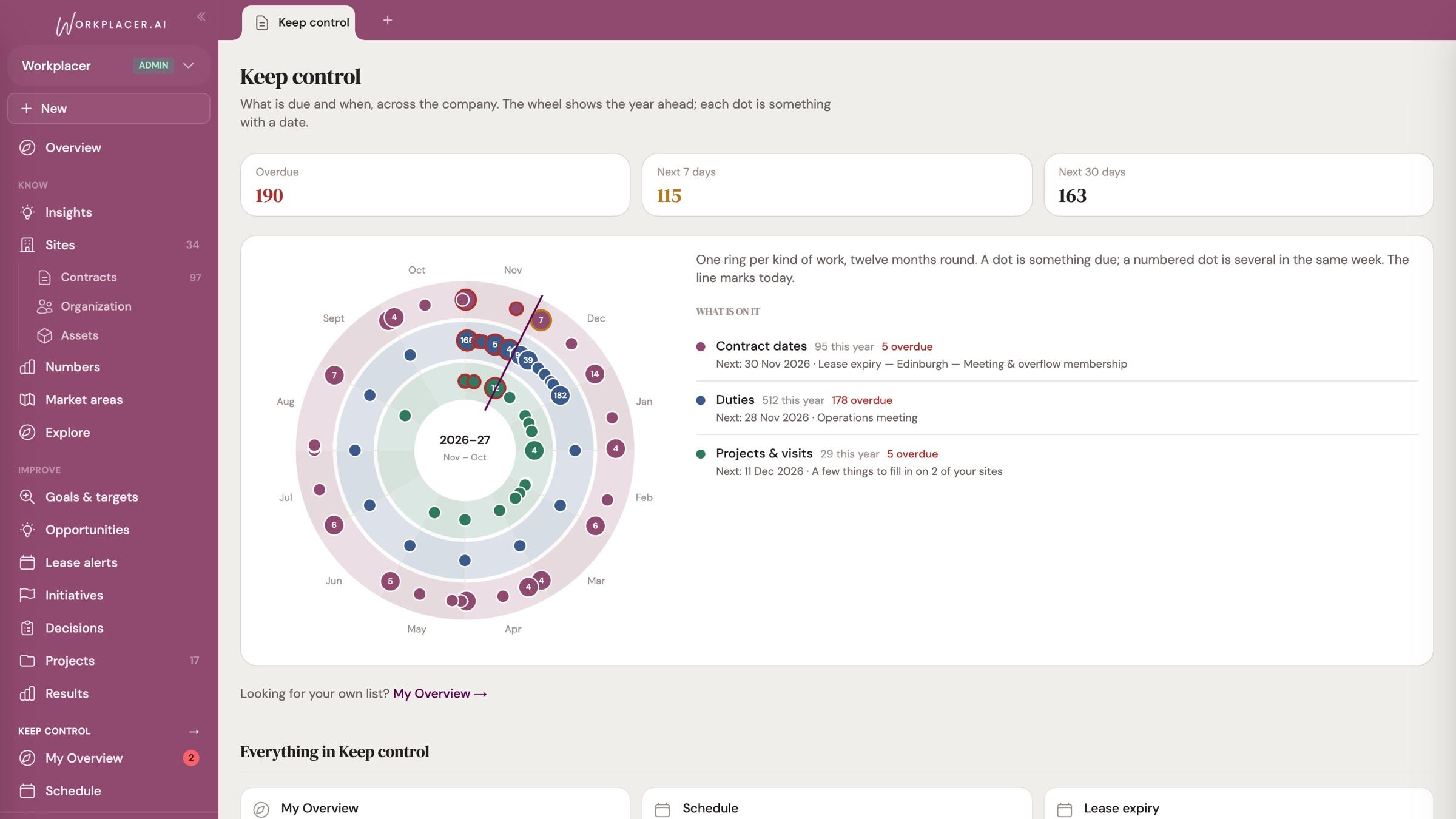
The year ahead

As it is in the product, on an example company.

Schedule

Everything with a date on one calendar: decisions, contract dates, duties, tasks, visits and changes landing.

  • A month, a timeline or the year
  • Mine, my team or everyone, by kind and by site
  • Sync to Outlook or Google, or export the dates
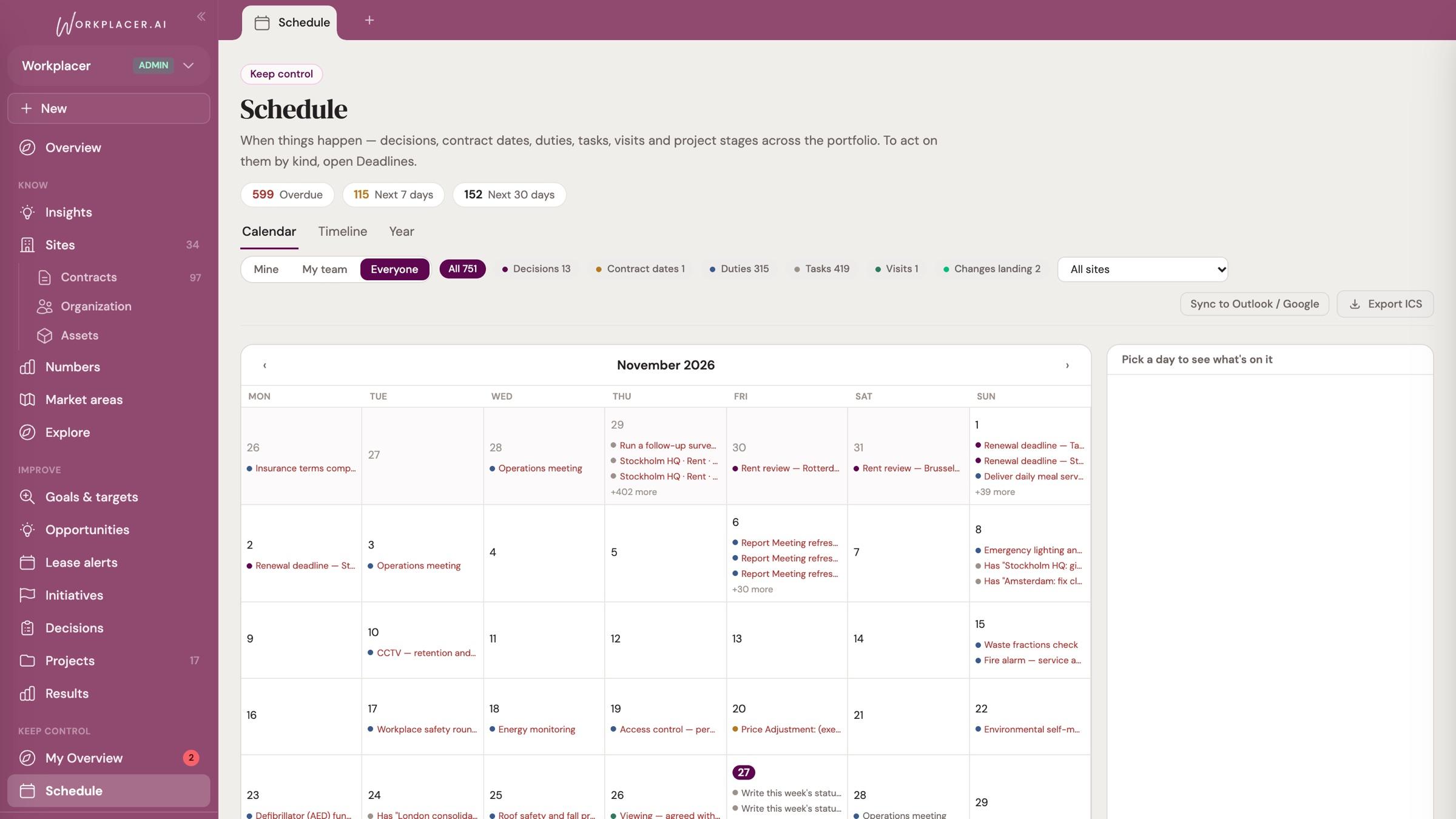
Schedule

As it is in the product, on an example company.

Lease expiry

How much rent comes up for a decision, when, and where it piles up.

  • Rent at risk by quarter, and the cliffs where it bunches
  • WALT, and concentration by landlord and by place
  • The notice calendar, with what leaving would cost
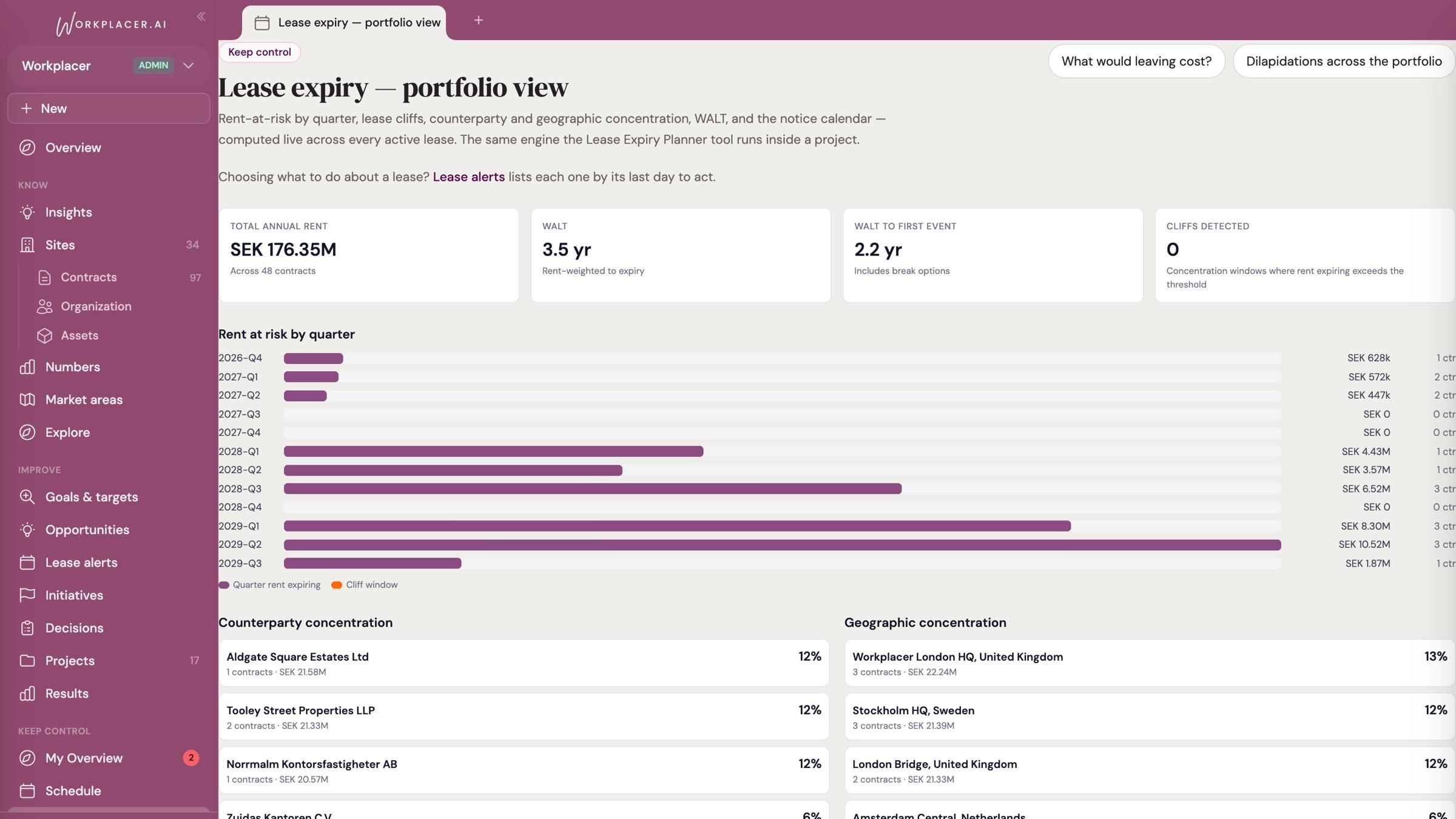
Lease expiry

As it is in the product, on an example company.

What it is for

Workplacer Control, in plain words

Keep control is the day-to-day. Knowing the estate and deciding to change it both produce work: a notice to serve, a duty to carry out, an approval to give, a date to confirm. This pillar gathers that work in one place for each person and makes sure nothing passes unnoticed.

How to read it

The pictures, and how each is read

Drawn from the product, with example figures. The numbers match the notes beneath.

My Overview: everything that needs you
"Your work", sorted by urgency.

Example

Overdue

Serve notice · Malmö leaseContract duty3 days late

Due today

Approve the delivery plan · HQ moveApprovaltoday

This week

Weekly status · Göteborg fit-outTaskin 4 days

Waiting on you

Lease renewal · 9 months outAllocationrespond

Later· folded away until you open it

123
  1. 1

    Five groups by urgency: Overdue (red), Due today, This week, Waiting on you and Later. "Waiting on you" holds what has no date but needs your answer: allocations, approvals, reviews, flags and confirmations.

  2. 2

    Each row says what kind of thing it is and has one action: Mark done, Manage, Respond, Review, Decide or Open.

  3. 3

    Later is folded away so that it does not crowd what is close.

Where to start

Start from what you are there to do

You want to know what is waiting for you
Your work

My Overview, tasks and the schedule, and how to tune what reaches you.

You make sure nothing is missed across the estate
Keeping the estate in order

Lease expiry, allocations, the logger and the rhythm.

You run the team
Team routines

A weekly, monthly and quarterly way of working.

See it step by step

Follow one job through every step it takes.

Lease events →Costs →Assets & operations →All capabilities →
How the products fit

One base, three layers = Workplacer Full

WorkplacerControlKeep controlKeeps it under control: every date on time, an owner on every agreement, duties and follow-ups tracked.WorkplacerImproveImproveSteers it towards your goals: opportunities found in your data, every change run as an initiative, projects with the toolbox. Also per project.WorkplacerReport & AskReport & askReports, board packs and answers from your own data — ask AI anything and see where every answer comes from.
The baseWorkplacer KnowKnowThe base every other product stands on: every site, agreement, cost and headcount read in from your own documents and data — one live picture of the estate.
=WorkplacerFullKnowKeep controlImproveReport & askAll four together: the estate known, under control, steered towards your goals and reported on.
Under ten sites? Workplacer Light sits beside it — one slim tool to run it all.See how it fits together →

See your own year on one wheel.

Send us a few leases and we will show you their dates, their owners and the reminders, in thirty minutes.

Book a demo →How the products fit
Workplacer.AI
One place to run your company's real estate.
Book a demo →
Articles on corporate real estate, every two weeks.
Product
Workplacer KnowWorkplacer ImproveWorkplacer ControlWorkplacer Report & AskWorkplacer FullWorkplacer LightPlansHow it fits together
Capabilities
OccupancyLease eventsCostsAssets & operationsPortfolio strategyBusiness caseFinding spaceSpace planningMovesAll capabilities
Customers
Customer storiesWho it's forPlan your dataThe launch filmInsights
Company
AboutProduct storyTrust and securityinfo@workplacer.aiLinkedInSign in

© 2026 Workplacer Sweden AB. All rights reserved.

Hosted in the EU · Privacy Policy · DPA